![logo-white.svg]](https://www.celus.io/hubfs/logo-white.svg)
| 📝Contents |
|
Sections of Project Settings |
The Project Settings in the CELUS Design Platform is where users define essential metadata and preferences that guide in the generation of Project.
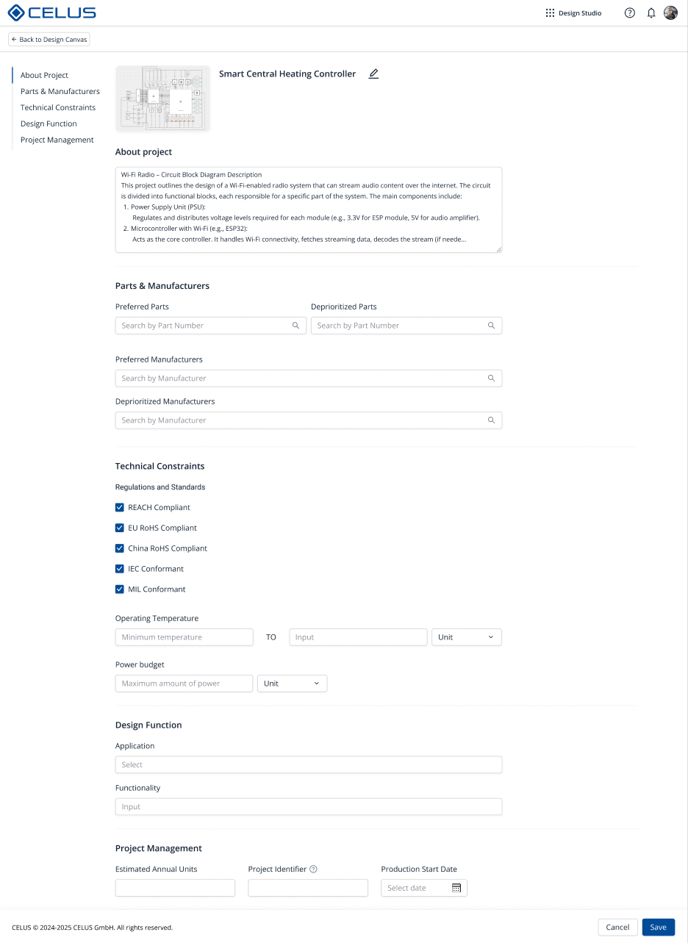 Design Canvas - Project Settings
Sections of Project Settings
1. About Project
- Project Description
2. Parts & Manufacturers
-
Preferred Parts/Manufacturers
Users may optionally define a preference list. This setting informs the CUBO matching process by prioritizing preferred Manufacturer Part Number (MPN) and Manufacturer based CUBOs.
-
Excluded Parts/Manufacturers
Use this to omit certain parts or suppliers from consideration, for example, due to obsolescence or procurement constraints.
3. Technical Constraints
This section allows teams to clarify system-level considerations that may guide design decisions, such as:
-
Environmental or regulatory requirements (e.g., RoHS, MIL).
-
Constraints on temperature range, voltage levels, or power consumption.
4. Design Function
-
Functionality Tags
Select one or more from a predefined list (e.g., Power Tools, RF Communication).
-
Application Domain
Choose target domains such as IoT,Automotive, or Consumer Electronics.
5. Project Management
-
Estimated Annual Units
Define the expected production volume for the project. This information is useful for documenting scale and planning, but is optional. -
Project Identifier
Enter an internal reference or tracking code that helps organize and distinguish this project within your team or company records. -
Product Start Date
Specify the planned launch or production start date. This serves as a scheduling reference and aids in project timeline management.