Documentation
Platform Workflow
The Project Settings page in the CELUS Design Platform lets you define key metadata and preferences that guide how your project is generated and resolved, including project description, preferred or excluded parts and manufacturers, technical constraints, functionality tags, application domains, and project management details such as production volume and start date. Celus These settings help tailor CUBO matching and ensure designs align with your technical and organizational requirements before moving into the Design Canvas. Celus Setting these details early improves the relevance of component suggestions and supports better planning and documentation throughout your design workflow.
📝Contents
Sections of Project Settings
About Project
Parts & Manufacturers
Technical Constraints
Design Function
Project Management
The Project Settings in the CELUS Design Platform is where users define essential metadata and preferences that guide in the generation of Project.
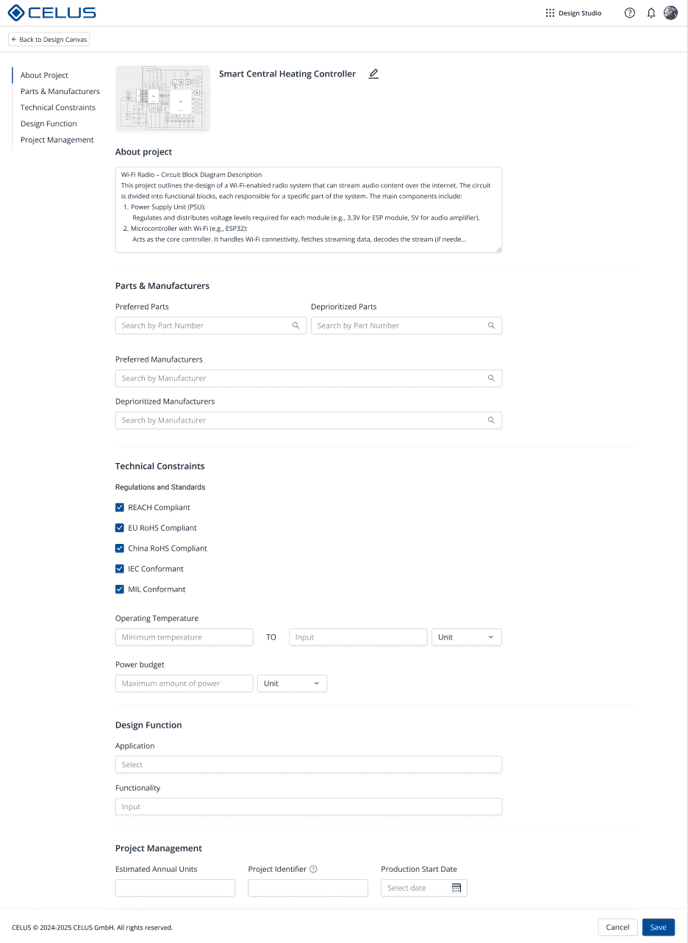
Design Canvas - Project Settings
1. About Project
Project Description
A free-text field where you briefly describe the project purpose, context, or use case.
2. Parts & Manufacturers
Preferred Parts/Manufacturers
Users may optionally define a preference list. This setting informs the CUBO matching process by prioritizing preferred Manufacturer Part Number (MPN) and Manufacturer based CUBOs.
Excluded Parts/Manufacturers
Use this to omit certain parts or suppliers from consideration, for example, due to obsolescence or procurement constraints.
3. Technical Constraints
This section allows teams to clarify system-level considerations that may guide design decisions, such as:
Environmental or regulatory requirements (e.g., RoHS, MIL).
Constraints on temperature range, voltage levels, or power consumption.
4. Design Function
Functionality Tags
Select one or more from a predefined list (e.g., Power Tools, RF Communication).
Application Domain
Choose target domains such as IoT,Automotive, or Consumer Electronics.
5. Project Management
Estimated Annual UnitsDefine the expected production volume for the project. This information is useful for documenting scale and planning, but is optional.
Project IdentifierEnter an internal reference or tracking code that helps organize and distinguish this project within your team or company records.
Product Start DateSpecify the planned launch or production start date. This serves as a scheduling reference and aids in project timeline management.
An intelligent electronics design platform that seamlessly automates component search, schematic generation, and EDA handover.
© Copyright 2026 CELUS · All rights reserved.